links: 010 Vim MOC
What is key mapping?
Key mapping is used to change the meaning of typed keys. The most common use is to define a sequence of commands for a function key.
Consider this scenario where you have to clear last search highlighting and found out that you need to type command noh or nohlsearch. What if you could assign this command to a mapping (a shortcut!) on your .vimrc file, to have the shortcut ,<space>
Vim Mapping is something very present in vim, and understanding it helps you improve productivity by converting long sequence of commands to one simple shortcut
Vim Mapping is very powerful and has tons of options and functionalities that handles many use cases
Understanding the key mapping structure
The basic structure is
map-command {lhs} {rhs}
nnoremap ,<space> :nohlsearch<CR>
you can pass special arguments
map-command map-argument {lhs} {rhs}
nnoremap <silent> ,<space> :nohlsearch<CR>
Exploring the structure
| map-command |
It’s the first thing, and implicitly the map-command defines:
- whether you’re adding new/removing/listing map.
- Whether the mapping will be recursive/non-recursive
- the mode where the mapping will be applied
From the example:
nnoremap defines that this is adding a new mapping to be applied in Normal mode and it’s non recursive.
| map-arguments |
It’s optional and must be defined right after the map-command, you can use one or more arguments combined, and they can be used in any order.
From the example:
<silent> defines that when you execute this mapping pressing ,<space>, the command :nohlsearch will not be echoed on the command line.
| {lhs} left hand side|
This is where you define the shortcut or the key(s) you’re gonna use, It can be a single key like , or a sequence of keys like ,<space>
From the example:
,<space> is the shortcut. it’s the sequence of keys that calls what you define on {rhs}
| {rhs} right hand side |
This is where you define what will your shortcut replace/execute when you press the key(s) defined at {lhs}. It can replace a key or sequence of keys, it can call vim native commands(like previous example) or functions you created using vimscript language/lua. Things can be as complex as you wish
From the example:
:nohlsearch<CR> is what will be executed, vim will type :nohlsearchfollowed by the <Enter> key that is defined by <CR>.
Understanding the main commands and arguments
Let’s have a superficial look to understand the possibilities of commands and arguments
Map commands
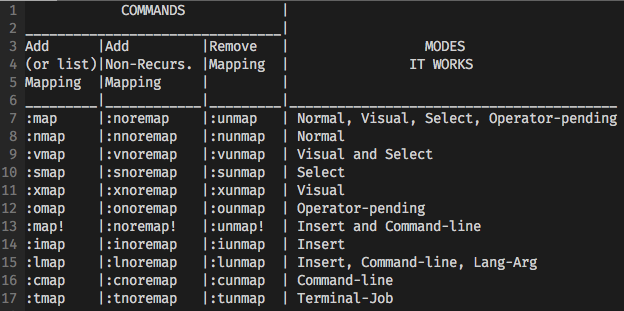
There are commands to add, list and remove mappings, they can be recursive or not, and they work in different modes
Special Arguments
The special arguments can be used in any order, but they must appear right after the map command, before any other arguments
They are:
<buffer>
Keep the mapping restricted to current buffer where the command is being executed. It allows you to use the same key(s) with a different mapping on another buffer.
This argument can also be used with the command to remove a mapping from the current buffer.
<nowait>
It basically tells the vim if you type the characters defined in {lhs}, vim must not wait for anymore characters to be typed and execute this mapping right away!
It’s important to know that if you do type more characters, it will be used and thrown after the mapping execution.
<silent>
It prevents the mapping to be echoed on command line.
<special>
It’s used to indicate the you’ll use the <> notation to define a mapping for special keys (example :map <special> <F12> /Header<CR> )
<script>
It’s mostly used when creating plugins and scripts. Basically it’s used to avoid inferences on mappings that are present on scripts
<expr>
It defines that the {lhs} will be an expression, and this expression will be evaluated to obtain {rhs}
<unique>
Used to overwrite the mapping that already exists for specific that key(s)
For more info check :help mapping
Attention! some advice before you start creating your own mappings
- It makes sense to create your own mappings and save it in
.vimrcfile to have it always on hands - It’s recommended to use non recursive mappings, unless there is a special case where you need the recursive behavior
- Vim has commands for almost every key so, when creating mappings you must make good choices. Avoid changing the behavior of vim’s most important keys/commands. Get the best orientation at
:help map-which-keys. - If you need some help about how to use some specific keys at
{lhs}and{rhs}, check:help key-notationand:help map-special-chars. - Improve your workflow, don’t exaggerate! First create mappings for commands that are slowing down your workflow, or for that key you need very often and it’s hard to reach on your keyboard model
sources: